MCP server
Connect Claude/ChatGPT to your workspace — the durable Convex MCP server, its tools, and how to authenticate.
RenovAI ships a durable MCP server so an AI assistant can read and update your workspace directly. It’s a JSON-RPC endpoint served from Convex at https://<deployment>.convex.site/mcp.
It speaks the Streamable HTTP transport and implements the latest MCP spec, 2025-11-25: POST a JSON-RPC message and you get back either a single JSON response (the default) or, for a long-running tool, a text/event-stream (SSE) stream of progress events ending in the result. Clients that only speak the streamable transport connect the same way — no separate setup. Plain JSON-only clients keep working unchanged.
On initialize the server negotiates the protocol version: it honours your requested version when it’s one it supports (2025-11-25, 2025-06-18, 2025-03-26, or 2024-11-05) and otherwise answers with its latest, 2025-11-25. Older clients are never broken.
Connecting
First, mint a token in Settings → MCP tokens (shown once). Then:
Claude Code
claude mcp add --transport http renovai https://<deployment>.convex.site/mcp \
  --header "Authorization: Bearer renovai_mcp_<your-token>"
Claude Desktop / other stdio clients — bridge with mcp-remote:
{
  "mcpServers": {
    "renovai": {
      "command": "npx",
      "args": ["-y", "mcp-remote", "https://<deployment>.convex.site/mcp",
               "--header", "Authorization: Bearer renovai_mcp_<your-token>"]
    }
  }
}
How auth & scoping work
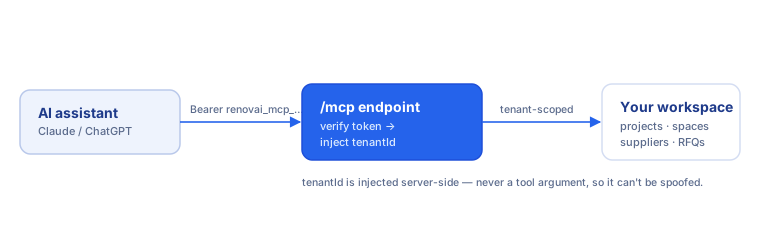
Every tools/call carries Authorization: Bearer renovai_mcp_…. The server resolves the token to its owning { userId, tenantId } and injects tenantId into every tool call server-side — it’s never a tool argument, so the model can’t supply or spoof it. Each tool re-verifies that the rows it touches belong to that tenant. Only a SHA-256 hash of the token is ever stored.
Tool catalog
The server exposes full CRUD parity with the RenovAI web app: every entity you can read, create, update or delete in the UI has a matching tool. Each tool declares its nature so a client can render and gate it sensibly — read (query), create, update, delete (destructive), or action (a side-effecting call such as sending email or minting a signed URL). Deletes require confirmation before they run (see Protocol capabilities).
tenantId is never a tool argument — it’s derived from your bearer token and
injected server-side (see How auth & scoping work), so it
never appears in the Key args below.
When calling a discovered delete operation through run_renovai_delete, set
confirm: true on the gateway only; that is the authoritative confirmation.
Uploading files from an agent
Call get_server_capabilities first. Direct upload URLs use the same stable
RenovAI origin and accept up to 20 MiB. For a sandbox with no client egress,
use begin_upload → append_upload_chunk → finish_upload (50 MiB maximum;
the server supplies a 3 MiB raw chunk size). ingest_document_from_url safely
fetches a public HTTPS document server-side. Each route returns an r2Key for
the existing record tool; no separate record migration is required.
Projects & homes
| Tool | Nature | Purpose | Key args |
|---|---|---|---|
list_projects |
read | List all renovation projects, newest first | — |
get_project |
read | Get one project by id | projectId |
create_project |
create | Create a renovation project | name, type |
update_project |
update | Patch a project (name, status, deadline…) | projectId |
delete_project |
delete | Permanently delete a project and its dependents | projectId, confirm |
list_homes |
read | List homes/properties in the workspace | — |
get_home |
read | Get one home by id | homeId |
create_home |
create | Create a home/property | name |
update_home |
update | Patch a home | homeId |
delete_home |
delete | Permanently delete a home | homeId, confirm |
Spaces (rooms) & elements
| Tool | Nature | Purpose | Key args |
|---|---|---|---|
list_spaces |
read | List the spaces (rooms) of a project | projectId |
create_space |
create | Add a space (room) to a project | projectId, name, type |
update_space |
update | Patch a space | spaceId |
delete_space |
delete | Delete a space (cascades to its elements) | spaceId, confirm |
list_elements |
read | List the elements of a space | spaceId |
create_element |
create | Add an element (fixture/surface) to a room | spaceId, category, name |
update_element |
update | Patch an element | elementId |
delete_element |
delete | Delete an element | elementId, confirm |
Tasks & timeline
| Tool | Nature | Purpose | Key args |
|---|---|---|---|
list_tasks |
read | List the renovation tasks of a project | projectId |
create_task |
create | Create a task on a project | projectId, description, category |
update_task |
update | Patch a task via a partial patch | taskId |
delete_task |
delete | Delete a task | taskId, confirm |
get_timeline |
read | Get the most recent timeline events for a project | projectId |
add_timeline_event |
create | Append a timeline event to a project | projectId, type |
update_timeline_event |
update | Patch a timeline event | eventId |
delete_timeline_event |
delete | Delete a timeline event | eventId, confirm |
timeline_ideation_context |
read | Room/element inventory + duration heuristics + budgets for a project, in one call (data only — no recommendations) | projectId |
Materials, bundles & selections
| Tool | Nature | Purpose | Key args |
|---|---|---|---|
list_materials |
read | List materials for a task or home | taskId/homeId |
create_material |
create | Add a material | description, quantity, unit, providedBy |
update_material |
update | Patch a material | materialId |
delete_material |
delete | Delete a material | materialId, confirm |
list_bundles |
read | List a project’s bundles (work packages) | projectId |
create_bundle |
create | Create a bundle | projectId, name |
update_bundle |
update | Patch a bundle | bundleId |
delete_bundle |
delete | Delete a bundle | bundleId, confirm |
list_selections |
read | List material selections + candidates (scope, quantity/BOM rollup, typed comparison values, install effort & computed TCO) | projectId |
create_selection |
create | Create a material selection (element/project/home scope, quantity, typed comparison columns) | name, comparisonAttributes |
update_selection |
update | Patch a material selection (name / quantity / comparison columns) | selectionId |
delete_selection |
delete | Delete a material selection | selectionId, confirm |
add_selection_candidate |
create | Add a candidate material (typed comparison values, installMinutes/installDifficulty, costBreakdown) |
selectionId, description |
choose_selection_candidate |
update | Pick a candidate as the chosen material | selectionId, materialId |
reopen_selection |
update | Reopen a decided selection | selectionId |
Inspiration (boards & assets)
| Tool | Nature | Purpose | Key args |
|---|---|---|---|
list_boards |
read | List a project’s inspiration boards | projectId |
create_board |
create | Create an inspiration board | projectId, name |
update_board |
update | Patch a board | boardId |
delete_board |
delete | Delete a board | boardId, confirm |
list_assets |
read | List a project’s assets | projectId |
get_asset_upload_url |
action | Mint a one-time RenovAI upload URL for an asset (returns signedUrl, r2Key; 20 MiB) |
projectId |
create_asset |
create | Persist an asset record after upload | projectId, r2Key, type |
update_asset |
update | Patch an asset (retag, re-pin, link) | assetId |
delete_asset |
delete | Delete an asset | assetId, confirm |
get_asset_url |
action | Mint a signed R2 download URL for an asset | assetId |
Suppliers & contacts
| Tool | Nature | Purpose | Key args |
|---|---|---|---|
list_suppliers |
read | List all suppliers in the workspace | — |
get_supplier |
read | Get a supplier together with its contacts | supplierId |
create_supplier |
create | Add a supplier | name |
update_supplier |
update | Patch a supplier | supplierId |
delete_supplier |
delete | Delete a supplier (cascades to its contacts) | supplierId, confirm |
list_contacts |
read | List a supplier’s contacts | supplierId |
create_contact |
create | Add a contact person to a supplier | supplierId, name, preferredChannel |
update_contact |
update | Patch a supplier contact | contactId |
delete_contact |
delete | Delete a supplier contact | contactId, confirm |
RFQs & quotes
| Tool | Nature | Purpose | Key args |
|---|---|---|---|
list_rfqs |
read | List a project’s requests-for-quote | projectId |
get_rfq |
read | Get an RFQ with its received quote responses | rfqId |
create_rfq |
create | Create a draft RFQ for a project + supplier | projectId, supplierId |
update_rfq |
update | Patch an RFQ (status, due date…) | rfqId |
delete_rfq |
delete | Delete an RFQ (cascades to its responses) | rfqId, confirm |
list_quote_responses |
read | List the quote responses received for an RFQ | rfqId |
record_quote_response |
create | Record a quote response for an RFQ | rfqId, totalQuote |
update_quote_response |
update | Patch a quote response | responseId |
delete_quote_response |
delete | Delete a quote response | responseId, confirm |
list_line_items |
read | List the line items of a quote response | rfqResponseId |
update_line_item |
update | Patch a line item (amount, wanted…) | lineItemId |
bundle_coverage |
read | Deterministic quote coverage for a bundle — which tasks have zero quote coverage yet | bundleId |
Finances
| Tool | Nature | Purpose | Key args |
|---|---|---|---|
list_finances |
read | List the home finance ledger | homeId (optional) |
create_finance_item |
create | Add a finance ledger item | name, direction, category, status |
update_finance_item |
update | Patch a finance item | financeId |
delete_finance_item |
delete | Delete a finance item | financeId, confirm |
start_finance_extraction |
action (streaming) | Extract money items from an uploaded document via AI — streams progress over SSE, or returns an id to poll | homeDocumentId |
get_finance_extraction |
read | Status/result of a start_finance_extraction job |
id |
list_finance_drafts |
read | List staged draft finance lines pending review | homeDocumentId |
approve_finance_drafts |
create | Commit reviewed draft lines into the finance ledger | items |
set_finance_period |
create | Record what a ledger item costs from a date (“the condo fee is $348 from 2027-07-01”) — the item becomes a step function over time | financeId, effectiveFrom, value |
list_finance_periods |
read | An item’s amount over time — the complete step function | financeId |
remove_finance_period |
delete | Drop a recorded amount change; the prior step resumes | periodId, confirm |
annualize_holding_costs |
read | What the recurring bills actually add up to over a window — respects when each bill started and stopped | homeId |
finance_year_review |
read | Year-end reality check: each rent-floor assumption beside what the ledger actually recorded, with variance | homeId, year |
Purchase facts, assumptions & mortgages
The input facts the financial analysis derives from.
| Tool | Nature | Purpose | Key args |
|---|---|---|---|
record_home_purchase |
update | Record what a home cost and when you took possession — price + closing costs − mortgage = the equity at risk | homeId, purchasePrice, possessionDate |
set_home_assumptions |
update | The honest-vs-optimistic inputs behind the rent floors, per home per tax year: vacancy, maintenance reserve, your own management time, target return, expected appreciation | homeId, year |
get_home_assumptions |
read | Read the recorded assumptions for a home + year (null = nothing recorded, which is honest, not an error) | homeId, year |
create_mortgage |
create | Record a mortgage as a real instrument: principal, term, amortization, contracted payment, starting rate | homeId, principal |
set_mortgage_rate |
update | Record a rate change from a date (fixed-payment variable: the payment stays, the interest/principal split shifts) | mortgageId, rate, effectiveFrom |
get_mortgage |
read | A mortgage with its current rate, full rate history, and trigger rate | mortgageId |
list_mortgages |
read | Every charge on a home (the floors model the first; more than one is flagged in warnings) | homeId |
get_amortization_schedule |
read | Payment-by-payment schedule — computed from the instrument and rate history, never stored | mortgageId |
get_mortgage_annual_split |
read | How a calendar year’s payments split into interest vs principal | mortgageId, year |
Rent floors & returns
The bottom-up half of pricing a rental (comps are the top-down half). Reports, never recommendations.
| Tool | Nature | Purpose | Key args |
|---|---|---|---|
rent_floors |
read | The three floors in one call — cash-flow break-even, economic break-even, target-return — with every line that produced them | homeId, year |
rent_roi |
read | At this rent, what is your return? Cash flow + mortgage paydown + appreciation, fully decomposed | homeId, year, monthlyRent |
rent_roi_scenarios |
read | The same return swept across a grid of rents × appreciation rates | homeId, monthlyRents, appreciationRates |
Tax & CCA (Canada)
| Tool | Nature | Purpose | Key args |
|---|---|---|---|
record_cca_addition |
create | Record a depreciable Class 8 purchase against a home (RenovAI deliberately does not do buildings) | homeId, cost |
list_cca_additions |
read | The Class 8 additions recorded against a home, with receipts | homeId |
get_cca_schedule |
read | The Class 8 pool year by year: additions, UCC, and the maximum deduction available — a suggestion, not a filing | homeId |
export_t776 |
read | A T776 Statement of Real Estate Rentals for a home + calendar year, line code by line code | homeId, year |
Comps (rent comparables)
Competing rental units observed on the market, recorded against a Home to answer “what should I ask for this unit?”. RenovAI reports the spread and the comps behind it — it never recommends a rent (the judgement is the assistant’s). The Baseline (get_market_baseline, city-wide) and the Spread (comp_spread, this Home’s own comps) answer different questions and must never be blurred into one number.
| Tool | Nature | Purpose | Key args |
|---|---|---|---|
list_comps |
read | List a Home’s comps (defaults to active; status for rented/archived/all) |
homeId |
comp_spread |
read | Report the spread over a Home’s active comps + the comps behind it (a report, never a recommended rent) | homeId |
add_comp |
action | Add a comp — explicit fields (no fetch) or a listing sourceUrl to scrape; returns the comp + updated spread |
homeId |
update_comp |
update | Fix up a comp’s facts (partial patch; null clears) | compId, patch |
set_comp_status |
update | Mark a comp active/rented/archived (a rented comp’s price is the last asking price, never the achieved rent) |
compId, status |
delete_comp |
delete | Permanently delete a comp + its photos (prefer archiving) | compId, confirm |
search_comps |
action | Search RentFaster for comp candidates near a Home (Calgary v1; page 1, cached, capped) — returns candidates, creates nothing | homeId |
add_searched_comp |
action | Turn one search_comps candidate into a comp; returns the comp + updated spread |
homeId, candidate |
get_market_baseline |
read | City-wide StatCan asking-rent baseline for a Home’s CMA + bedroom count, latest + series (cite the source & reference period) | homeId |
Listings & applications
Public rental listing sites — one per home, on a free URL (renovai.app/listing/<slug>) plus an optional custom domain. See Listings.
| Tool | Nature | Purpose | Key args |
|---|---|---|---|
list_listings |
read | List the workspace’s unit listing sites, newest first | — |
get_listing |
read | One listing: status, public content, availability, secret preview token | listingId |
create_listing |
create | Create a DRAFT listing site for a home (one per home); free URL minted from its name, hostname optional |
homeId, headline, currency |
update_listing |
update | Patch public content or availability (rent, facts, amenities, term pricing, blocked ranges, hostname…) | listingId |
set_listing_status |
update | Publish/unpublish — publishing requires a headline and ≥1 gallery photo | listingId, status |
delete_listing |
delete | Delete a listing + photo records; refuses while applications still reference it | listingId, confirm |
list_listing_photos |
read | The ordered gallery + the single floor-plan slot | listingId |
get_listing_photo_upload_url |
action | Step 1 of 2: mint a presigned upload URL for a photo | listingId, contentType |
add_listing_photo |
create | Step 2 of 2: record the uploaded photo (gallery appends; floorplan replaces the slot) |
listingId, r2Key, role |
delete_listing_photo |
delete | Remove one photo from the listing | photoId, confirm |
list_applications |
read | The applicant pipeline (new → reviewing → shortlisted → accepted/rejected), workspace-wide or per listing | listingId (optional) |
get_application |
read | One tenant application | applicationId |
set_application_status |
update | Move an application through the pipeline; accepting creates the pending tenancy record | applicationId, status |
delete_application |
delete | Delete an application and its personal data (PII removal) | applicationId, confirm |
Nearby places
Landlord-curated points of interest on a listing, sourced from OpenStreetMap. Only included rows reach the public site; exclusions, renames, and manual additions all survive refreshes.
| Tool | Nature | Purpose | Key args |
|---|---|---|---|
list_nearby |
read | A listing’s POIs — included and excluded alike, in category then curation order | listingId |
refresh_nearby |
action | Re-query OpenStreetMap and reconcile — the only thing that refetches | listingId |
set_nearby_included |
update | Include/exclude one POI (exclusion sticks across refreshes — this, not deletion, is how an OSM POI leaves) | poiId, included |
add_nearby_poi |
create | Add a POI OSM doesn’t have (source manual, never rewritten by refresh); distance is measured server-side |
listingId, name, category |
rename_nearby_poi |
update | Display-name override; OSM’s own name is kept underneath (null/“” drops the override) | poiId, name |
reorder_nearby |
update | Set one category’s display order | listingId, category, poiIds |
remove_nearby_poi |
delete | Delete a manually-added POI (refuses on OSM-sourced ones — they’d just come back; exclude instead) | poiId, confirm |
Furnishings
Things to buy per room — furniture, decor, soft goods, appliances — each with competing candidates. See Furnishings.
| Tool | Nature | Purpose | Key args |
|---|---|---|---|
list_furnishings |
read | Furnishing items + candidates + chosen cost, for one home or a project’s rooms | homeId/projectId |
create_furnishing_item |
create | Create an item in a room (home derived from the room) | spaceId, name, category |
update_furnishing_item |
update | Patch an item (name, quantity, targetBudget, notes…) | furnishingItemId |
delete_furnishing_item |
delete | Delete an item + all its candidates | furnishingItemId, confirm |
add_furnishing_candidate |
create | Add a specific product as a candidate | furnishingItemId, name |
scrape_furnishing_candidate |
action | Fetch a product URL and add it as a candidate — auto-extracts name, retailer, price, image | furnishingItemId, url |
update_furnishing_candidate |
update | Patch a candidate | candidateId |
choose_furnishing_candidate |
update | Pick the winner; losers are archived, not deleted | furnishingItemId, candidateId |
reopen_furnishing_item |
update | Clear the choice; every candidate back in contention | furnishingItemId |
delete_furnishing_candidate |
delete | Delete one candidate | candidateId, confirm |
furnishing_home_rollup |
read | Per-room and whole-home chosen spend vs target budget | homeId |
capitalize_furnishing |
action | Turn a chosen furnishing into a Class 8 capital addition against its home (feeds CCA + the rent floors) | furnishingItemId |
Documents vault
| Tool | Nature | Purpose | Key args |
|---|---|---|---|
list_documents |
read | List the home documents vault | homeId / projectId (optional) |
get_document_upload_url |
action | Mint a one-time RenovAI upload URL for a document (returns signedUrl, r2Key; 20 MiB) |
fileName, contentType |
begin_upload / append_upload_chunk / finish_upload |
create | Upload up to 50 MiB through MCP without client egress; finish returns r2Key |
kind, file metadata, chunks |
ingest_document_from_url |
action | Fetch a public HTTPS document server-side (50 MiB cap) | url |
record_document |
create | Register a vault document after upload; optionally project-scoped | docType, title, r2Key |
update_document |
update | Patch a document’s metadata | documentId |
delete_document |
delete | Delete a vault document | documentId, confirm |
get_document_url |
action | Mint a signed R2 download URL for a document | documentId |
Move-in walkthrough (appliances & utility accounts)
Taking stock of a home you’ve just moved into — see Move-in walkthrough.
Best driven by the move_in_walkthrough prompt (see Prompts) rather than
called cold. An appliance belongs to the home; spaceId is optional (HVAC and water
heaters belong to no room).
| Tool | Nature | Purpose | Key args |
|---|---|---|---|
get_walkthrough_state |
read | What’s still uncaptured for a home: rooms + their appliance counts and walked stamps, utility services with no account, appliances with no manual. Reports gaps; recommends nothing | homeId |
create_appliance |
create | Record an appliance. Brand is the only detail required — brand alone is worth recording | homeId, brand |
list_appliances |
read | List a home’s appliances | homeId |
update_appliance |
update | Patch an appliance (fill in model/serial/warranty once known) | applianceId |
delete_appliance |
delete | Permanently delete an appliance | applianceId, confirm |
attach_manual |
action | Fetch a manual PDF from a URL you supply into the vault, linked to the appliance. Must be the PDF itself — a support page is HTML and is refused | applianceId, url |
mark_room_walked |
update | Mark a room checked — including when it’s genuinely empty, which is what stops it looking unvisited | spaceId |
create_utility_account |
create | Record a utility/internet account. Account numbers only — no passwords, ever | homeId, service, provider |
list_utility_accounts |
read | List a home’s utility accounts | homeId |
update_utility_account |
update | Patch a utility account | utilityAccountId |
delete_utility_account |
delete | Permanently delete a utility account | utilityAccountId, confirm |
The client does the searching. attach_manual only fetches a URL you give it — RenovAI
has no manual-search engine. The assistant web-searches brand + model, finds the
manufacturer’s PDF, and passes the link. The fetch is SSRF-guarded, must return
application/pdf, and is capped at 25MB.
No tool takes an image. The camera work happens entirely on your side: the assistant
reads the data plate itself and passes the text to create_appliance.
Source references
Lightweight {url, title?, note?} citations attachable to a project, element, or
selection — the home for research links, spec sheets, and product citations that
back a decision. Pass exactly one of projectId / elementId / selectionId.
| Tool | Nature | Purpose | Key args |
|---|---|---|---|
add_source_reference |
create | Attach a citation to a project/element/selection | url + one of projectId/elementId/selectionId |
list_source_references |
read | List the citations on a project/element/selection | one of projectId/elementId/selectionId |
delete_source_reference |
delete | Delete one citation | referenceId, confirm |
Conversations & messaging
| Tool | Nature | Purpose | Key args |
|---|---|---|---|
list_messages |
read | List a project’s conversations and their messages | projectId |
send_supplier_message |
action | Email a supplier (sets a per-conversation Reply-To so replies thread back in) | projectId, supplierId, subject |
reply_to_conversation |
action | Reply to an existing email conversation and record the outbound message | conversationId, bodyHtml/bodyText |
delete_conversation |
delete | Permanently delete a conversation and all its messages/attachments | conversationId, confirm |
Magicplan & plan extraction
| Tool | Nature | Purpose | Key args |
|---|---|---|---|
get_magicplan_context |
read | The full parsed Magicplan plan for a home | homeId or projectId |
generate_import_email |
action | Get or mint your Magicplan import email address | — |
import_magicplan |
update | Import a Magicplan Statistics CSV into a home; pass a projectId instead to also scope the rooms into that project (see Magicplan import) |
homeId or projectId, csvText |
extract_plan |
action (streaming) | Extract rooms from an uploaded floor-plan image via vision AI — streams progress over SSE, or returns an id to poll | projectId, r2Key |
get_plan_extraction |
read | Status/result of an extract_plan job (running / done / error) |
id |
A typical assistant flow: create_project → import_magicplan (paste the CSV) → list_spaces to confirm the rooms imported. Rooms belong to the Home, so import_magicplan works with just a homeId when there is no renovation project — use list_home_spaces to confirm those.
Workspace settings
| Tool | Nature | Purpose | Key args |
|---|---|---|---|
get_tenant_settings |
read | Workspace-wide settings — defaultCurrency is only the fallback for homes whose country doesn’t imply one |
— |
set_tenant_settings |
update | Change workspace settings; never overrides a home that knows its own currency | defaultCurrency |
tools/list returns one deterministic catalogue of roughly 25 intent-level workflow,
context, and gateway tools. Hundreds of exact domain operations remain available without
forcing every model to choose among them upfront:
- Call
find_renovai_toolswith the task in the user’s own language. - Use the returned exact schema directly when the client already knows that operation,
or pass it to
run_renovai_read,run_renovai_change, orrun_renovai_delete. - Existing integrations may continue calling granular operation names directly; hiding them from the default catalogue does not remove or weaken them.
Common outcomes have dedicated workflow tools. For example,
record_home_transactions resolves a Home by name/address and records a retry-safe batch
of paid or upcoming transactions, with or without receipt evidence.
Protocol capabilities
The server implements the 2025-11-25 feature set on top of the plain JSON-RPC calls, so capable clients get richer, safer interactions while simpler clients keep working:
- Tool annotations. Every tool carries advisory hints —
readOnlyHint,destructiveHint,idempotentHint,openWorldHint, plus a humantitle— surfaced intools/list. Clients use them to render and gate tools (e.g. flag destructive deletes, badge read-only queries, mark tools that reach external systems like email or R2). They’re hints, not a security boundary — tenancy is always enforced server-side regardless. - Structured output. Tools that return structured data advertise an
outputSchema(JSON Schema 2020-12) intools/listand emitstructuredContentalongside the human-readable text in everytools/callresult, so a client can consume results as typed JSON without re-parsing prose. - Elicitation-based delete confirmations. Destructive
delete_*tools require confirmation before they run. Clients that support elicitation get an interactiveelicitation/createround-trip over SSE — a precise impact preview of exactly what will be destroyed (including cascade counts where relevant), which you accept or decline; the tool only runs on accept. Clients that don’t support elicitation get a non-error result asking them to re-invoke the tool withconfirm: true. Either way, nothing is deleted without an explicit second step. - Workflow input elicitation. Intent-level workflows validate the entire request
before writing. When a necessary fact is missing or a Home name is ambiguous, capable
clients receive a structured form through
elicitation/create; older or JSON-only clients receive the same questions in aneeds_inputresult. No partial batch is written while waiting for an answer.
Prompts
The server exposes prompts — guided, multi-step flows you invoke by name (in Claude,
from the / menu). A prompt is a script the server hands your assistant; the assistant
then drives the tools. This is deliberately where step-by-step guidance lives: RenovAI’s
tools report data and never tell your assistant what to conclude, so anything shaped
like advice belongs in a prompt, not in a tool result.
| Prompt | Argument | What it does |
|---|---|---|
move_in_walkthrough |
home (id, name, or address) |
Walks a home you’ve just taken possession of, room by room — appliances, their manuals, then the utility accounts. Built for someone on a phone, possibly on voice, standing in the room. See Move-in walkthrough. |
Call prompts/list to discover them and prompts/get to fetch one. Clients that don’t
support prompts lose nothing else — every tool remains callable directly.